Letter size in pixels, and every common paper and photo size at 72, 150 and 300 ppi
You have a design or photo and need to know how many pixels it must be, but the numbers you find do not always agree. Letter size in pixels is 2550 x 3300 at 300 ppi, and this guide gives A4, A5, business card, poster and 4x6, 5x7 and 8x10 photo sizes at 72, 150 and 300 ppi in one copy-ready table, computed by code from the physical sizes.
Checklist
Quick answers
- Letter size in pixels: 2550 x 3300 at 300 ppi, 1275 x 1650 at 150 ppi, 612 x 792 at 72 ppi.
- A4 size in pixels: 2480 x 3508 at 300 ppi, 1240 x 1754 at 150 ppi, 595 x 842 at 72 ppi.
- A5 size in pixels: 1748 x 2480 at 300 ppi.
- Business card size in pixels: 1050 x 600 at 300 ppi for the common US 3.5 x 2 inch card.
- 5x7, 4x6 and 8x10 photos at 300 ppi: 1500 x 2100, 1200 x 1800 and 2400 x 3000 pixels.
- The formula is always the same: inches multiplied by pixels per inch. The table below does the sums for you.
Reference
Paper, card, photo and poster sizes at 72, 150 and 300 ppi
Copy this table into your notes. Every pixel value was produced by a short script, not typed by hand: it multiplies the physical size in inches by 72, 150 and 300 and rounds to the nearest whole pixel. A sizes start from millimetres, which the script converts at exactly 25.4 mm to the inch. The last column tells you whether the size is set by a standard or is just a common convention, because the two are not equal. Printers and services can ask for something different, so the number your printer gives you always wins.
| Size | Physical size | 72 ppi | 150 ppi | 300 ppi | Basis |
|---|---|---|---|---|---|
| US Letter | 8.5 x 11 in | 612 x 792 | 1275 x 1650 | 2550 x 3300 | ANSI Letter |
| US Legal | 8.5 x 14 in | 612 x 1008 | 1275 x 2100 | 2550 x 4200 | ANSI (per Kuhn) |
| US Tabloid | 11 x 17 in | 792 x 1224 | 1650 x 2550 | 3300 x 5100 | ANSI (per Kuhn) |
| A3 | 297 x 420 mm | 842 x 1191 | 1754 x 2480 | 3508 x 4961 | ISO 216 |
| A4 | 210 x 297 mm | 595 x 842 | 1240 x 1754 | 2480 x 3508 | ISO 216 |
| A5 | 148 x 210 mm | 420 x 595 | 874 x 1240 | 1748 x 2480 | ISO 216 |
| A6 | 105 x 148 mm | 298 x 420 | 620 x 874 | 1240 x 1748 | ISO 216 |
| Business card, US | 3.5 x 2 in | 252 x 144 | 525 x 300 | 1050 x 600 | Convention |
| Card, ISO/IEC 7810 ID-1 | 85.6 x 53.98 mm | 243 x 153 | 506 x 319 | 1011 x 638 | Standard (payment cards) |
| Photo 4x6 | 4 x 6 in | 288 x 432 | 600 x 900 | 1200 x 1800 | Convention |
| Photo 5x7 | 5 x 7 in | 360 x 504 | 750 x 1050 | 1500 x 2100 | Convention |
| Photo 8x10 | 8 x 10 in | 576 x 720 | 1200 x 1500 | 2400 x 3000 | Convention |
| Poster 18x24 | 18 x 24 in | 1296 x 1728 | 2700 x 3600 | 5400 x 7200 | Convention |
| Poster 24x36 | 24 x 36 in | 1728 x 2592 | 3600 x 5400 | 7200 x 10800 | Convention |
In depth
Letter size in pixels and how the number is worked out
US Letter is 8.5 x 11 inches, or 215.9 x 279.4 mm. At 300 ppi that is 8.5 x 300 = 2550 pixels wide and 11 x 300 = 3300 pixels tall. At 150 ppi it is 1275 x 1650, and at 72 ppi it is 612 x 792.
Browsers and word processors often work at 96 pixels per inch, which makes Letter 816 x 1056 pixels on screen. That is a screen convention, not a print size, so use 300 for anything that will be printed.
Page size is not the same as image size. If you want a full-bleed picture on a Letter page, make the image 2550 x 3300 pixels at least, and ask your printer whether it needs extra edge for trimming.
In depth
A4 size in pixels and A5 size in pixels
The A series is defined by ISO 216. A0 has an area of one square metre, every sheet has a height to width ratio of the square root of two, and each size is half the one before it, with the result rounded down to a whole millimetre. That gives A4 as 210 x 297 mm and A5 as 148 x 210 mm. The standard's own text is paywalled, so these values were checked against two summaries that cite it (see sources).
At 300 ppi A4 is 2480 x 3508 pixels and A5 is 1748 x 2480. At 150 ppi A4 is 1240 x 1754.
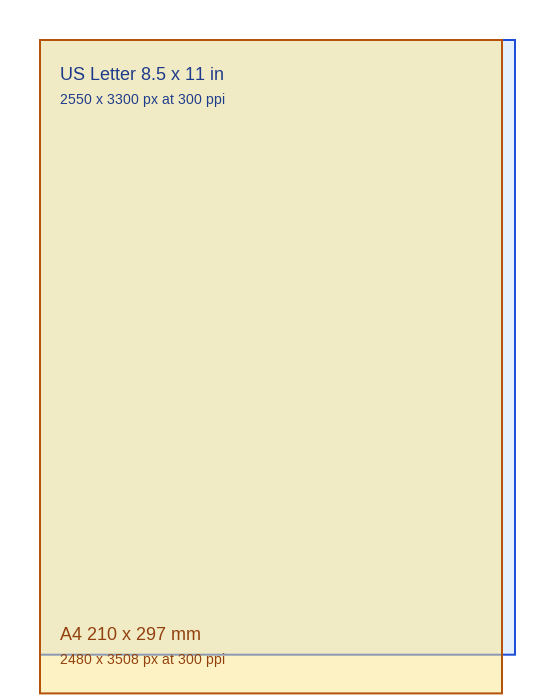
A4 and Letter look alike but differ. A4 is about 6 mm narrower and 18 mm taller than Letter, so a design made for one will either leave margins or lose edges on the other. If you send files to both sides of the Atlantic, keep important content away from the edges.
In depth
Business card size in pixels
There is no single business card standard that we could verify. The 3.5 x 2 inch card is the common US convention, and it comes to 1050 x 600 pixels at 300 ppi. Other countries use other sizes, so take the exact size from your printer's template.
The ISO/IEC 7810 ID-1 size, 85.60 x 53.98 mm, is the standard for payment and identity cards. It is listed in the table for comparison, but it is not a business card standard. At 300 ppi it is 1011 x 638 pixels.
Small print is where low resolution shows first, so use 300 ppi for a card and keep logos as sharp as you can.
In depth
Poster size in pixels
Poster sizes are conventions too. The usual US ones are 18 x 24 and 24 x 36 inches. At 300 ppi a 24 x 36 inch poster needs 7200 x 10800 pixels, which is about 77.8 megapixels. As a printer's rule of thumb, not a standard, posters are often printed at a lower ppi because viewers stand further away. At 150 ppi the same poster needs 3600 x 5400 pixels, and at 72 ppi 1728 x 2592.
The right ppi for a poster depends on how close people will stand. Ask your print shop for their minimum, then use the calculator to see whether your image meets it.
In depth
5x7, 4x6 and 8x10 photo size in pixels
Photo sizes are print-shop conventions, not standards. At 300 ppi a 4x6 print needs 1200 x 1800 pixels, a 5x7 needs 1500 x 2100 and an 8x10 needs 2400 x 3000.
Worked example with a 12-megapixel phone photo that measures 4032 x 3024 pixels. At 300 ppi it covers 13.44 x 10.08 inches, so there are plenty of pixels for an 8x10. But the shape differs: the photo is 4:3 and an 8x10 is 4:5 when held upright. Turned upright it is 3024 x 4032, and an 8 x 10 inch crop at that width is 3024 x 3780 pixels. That is 378 ppi, still above 300, with 252 pixels of height cropped away. The pixels were enough, the crop was the real decision.
Reference
Which ppi should you pick?
The ppi number saved in a file is metadata. A printer works from how many pixels the image has and how big you print it. Editing 72 to 300 in the file adds no detail; it only changes the print size the file claims.
| Use | ppi to aim for | Why |
|---|---|---|
| Business cards, flyers, photo prints held in the hand | 300 | Detail is seen close up |
| Posters and banners seen from a distance | 150, sometimes lower | The eye cannot resolve fine dots from far away; confirm with your printer |
| On-screen use | 72 to 96 is a label only | Screens show pixels, so only the pixel count matters |
Step by step
Get an image to the exact size
- 1
Open the print size calculator and enter the print size in inches or cm and your ppi to see the pixels you need.
- 2
Check your image's pixel size. If it has fewer pixels than needed, find a bigger original instead of enlarging, since enlarging adds no detail.
- 3
Crop to the right shape first if the ratio differs, as in the 8x10 example above.
- 4
Open the resize tool, enter the exact width and height in pixels with the proportion lock on, and export as JPG or PNG.
Checklist
Common mistakes
- Mixing up ppi and file size. Pixels are the size; the ppi label changes nothing.
- Resizing a small image up to reach 300 ppi. The count rises, the detail does not.
- Using Letter pixels for an A4 job, or the other way round.
- Forgetting that a photo ratio may not match the print ratio, so part of it gets cropped.
- Trusting a pixel figure that was converted from rounded millimetres. Work from the exact inch value.
In depth
Limits of this guide and the tool
The calculator is arithmetic. It does not check your printer's own requirements, bleed, colour profile or paper stock. Its built-in table of standard sizes lists 4x6, 5x7, 8x10, A6, A5, A4, A3, 12x18 and 16x20 at 300 and 150 DPI only. It does not list Letter, Legal or the 72 ppi column, so for Letter enter 8.5 and 11 yourself.
In depth
How this guide was made
The ISO 216 and Letter dimensions were read on 2026-11-15 from the sources listed below. ISO's own pages and the standard text could not be read automatically, so A sizes are confirmed from two summaries that cite the standard. Every pixel value in the table was computed by a script, not typed. The page was drafted with AI assistance and reviewed before publishing. Sizes marked Convention are not defined by a standard we could verify; US Legal and Tabloid are labelled ANSI X3.151 (as listed by Markus Kuhn) because the ANSI text itself was not read.
In pictures
See it
Is A4 the same size as US Letter?
No. A4 is 210 x 297 mm and Letter is 215.9 x 279.4 mm, so A4 is about 6 mm narrower and 18 mm taller. A file made for one will not fit the other without margins or cropping.
Does the ppi number saved in my image file matter?
Rarely. What counts is the pixel count against the print size, so the ppi tag in the file mostly just records a default. A 2550 x 3300 pixel image fills Letter at 300 ppi whether the tag says 72 or 300.
Why can Letter at 300 ppi come out as 2551 x 3295?
Because a converter can start from millimetres rounded to 216 x 279, and 216 / 25.4 x 300 comes to 2551 and 279 / 25.4 x 300 to 3295. Letter is defined as 8.5 x 11 inches, which gives exactly 2550 x 3300.
Can I enlarge a small image to reach the pixel size I need?
You can change the pixel count, but the image gains no real detail, so a print may look soft. Start from a larger original where you can.
What is the size of Letter and A4 for a web page or Word document?
Many screen tools use 96 pixels per inch, which gives Letter as 816 x 1056 and A4 as 794 x 1123. This is a screen convention, so use 300 ppi when the file will be printed.
Do it yourself
Tools used in this guide
Check the numbers
Sources and further reading
- Markus Kuhn, International standard paper sizes (summarises ISO 216 and ANSI sizes; ISO 216 text itself is paywalled), checked 2026-11-15
- ISO 216 standard page at iso.org (writing paper and certain classes of printed matter, A and B series), checked 2026-11-15, page blocked automated reading
- Wikipedia, ISO 216: A0 is 1 square metre, ratio square root of 2, sizes rounded down to the millimetre, checked 2026-11-15
- Wikipedia, Letter (paper size): 8.5 x 11 in, 215.9 x 279.4 mm, ANSI A, checked 2026-11-15
- Wikipedia, ISO/IEC 7810: ID-1 is 85.60 x 53.98 mm, used for payment cards and ID cards, checked 2026-11-15
Ready to try it?
Use the free tool or the full photo editor. Everything stays on your device.