Profile picture maker with rings, frames and badges
Turn any photo into a profile picture that stands out at 40 pixels wide: frame your face in a circle, swap the background for a clean colour, add a coloured or gradient ring, put a short message like OPEN TO WORK or HIRING along the bottom, and add an emoji or text badge. Export a square for LinkedIn, X, Instagram, Facebook or YouTube, or a round PNG for your website. It all runs on your device: no upload, no account, no watermark.
How to use it
- Open the editor and drop in a photo. For a clean look, open Remove BG first and remove the background.
- Click the profile icon in the left toolbar, or Profile picture maker under Quick Presets in the Adjust tab.
- Drag the photo to position your face and use Zoom. Tall photos start framed at head and shoulders.
- Pick a background colour or gradient, then turn on a Ring border, a Text frame or a Badge and choose colours.
- Choose Square for upload (platforms crop their own circle) or Round PNG, pick a size, and download.
Step by step
What you get
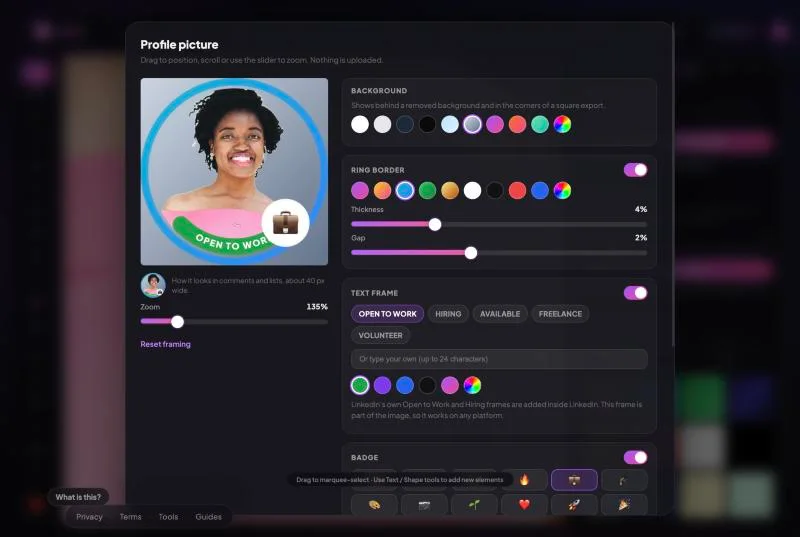
- Live circle preview plus a 40 px preview showing how it reads in comments and lists.
- Backgrounds: white, grey, navy, black, sky, studio and colour gradients, or any custom colour. Ideal after removing the background.
- Ring border in solid colours or gradients (Aura, Sunset, Ocean, Forest, Gold), with adjustable thickness and gap.
- Text frame along the lower edge: OPEN TO WORK, HIRING, AVAILABLE, FREELANCE, VOLUNTEER, or your own text up to 24 characters.
- Badge: 12 emoji or up to four characters of text, in seven colours, at any corner, sized as you like.
- Export 320, 400, 800 or 1080 px; square PNG or JPG, or round PNG with transparent corners.
- No upload, no signup, no watermark.
Which size for which platform
Sources and details are in the profile picture and banner sizes guide. Where a platform publishes no size, the export column is our advice.
| Platform | Official guidance | Export |
|---|---|---|
| At least 400 x 400; PNG or JPG, 8 MB | 800 px square | |
| X (Twitter) | 400 x 400 recommended; under 2 MB | 400 px square |
| Best at 320 x 320 | 800 px square | |
| YouTube | Renders at 98 x 98; under 15 MB | 800 px square |
| Instagram, Threads | No size published | 1080 px square |
| Website, email signature, slides | Not applicable | Round PNG, 400 or 800 px |
Rings, frames and badges that still look good small
Most people see your profile picture at around 40 pixels, in a comment or a list of names. At that size, a thin ring reads as a colour accent and a thick one swallows the face. Keep the ring at 3 to 5% and the gap at 1 to 2%. Text frames read best with short words in capitals; long custom text gets small. A badge works when it is simple: one emoji or two or three characters. The small preview in the maker shows exactly how it reads at that size.
Use contrast deliberately. A gradient ring around a neutral studio background stands out; a gradient ring around a busy photo competes with it. Removing the background first and choosing a plain colour is the most reliable way to a professional result.
A note on LinkedIn’s own frames
LinkedIn offers its own Open to Work and Hiring frames, added inside LinkedIn and tied to your profile settings, so recruiters’ searches can pick them up. A frame made here is part of the picture itself: it works on any platform, in any colour, with your own words, but LinkedIn does not know it is there. If the search feature matters to you, use LinkedIn’s frame on LinkedIn and this one elsewhere.
Where not to use borders and badges
Profile pictures, yes. Product photos, no: Amazon and eBay both prohibit added borders, badges and text on listing photos. The marketplace guides cover their exact rules.
Most online editors upload your pictures to their servers. EditXo does all of its processing, including the AI, inside your browser. Read the privacy policy for the full picture.
Frequently asked questions
Are my photos uploaded to a server?
No. EditXo runs entirely inside your browser using your own device. Your images are never uploaded, transmitted or stored by us, so there is nothing for anyone to intercept or leak.
Should I upload a round or a square image?
Square, for social platforms. They crop their own circle and some fill transparent corners with white or black. Use the round PNG for websites, email signatures and documents.
Can I remove the background first?
Yes, and it is the best way to get a clean result. Remove the background in the Remove BG tab, then open the maker and pick a background colour or gradient.
Is this the same as LinkedIn’s Open to Work frame?
It looks similar but it is part of the image, not a LinkedIn setting, so LinkedIn does not use it for search. It works on every platform and in any colour.
Can I use my own text in the frame or badge?
Yes. The frame takes up to 24 characters and the badge up to four. Short capitals read best at small sizes.
Is EditXo free? Do I need an account?
EditXo is free to use and there is no account to create. Open the editor, drop in a photo and start editing.